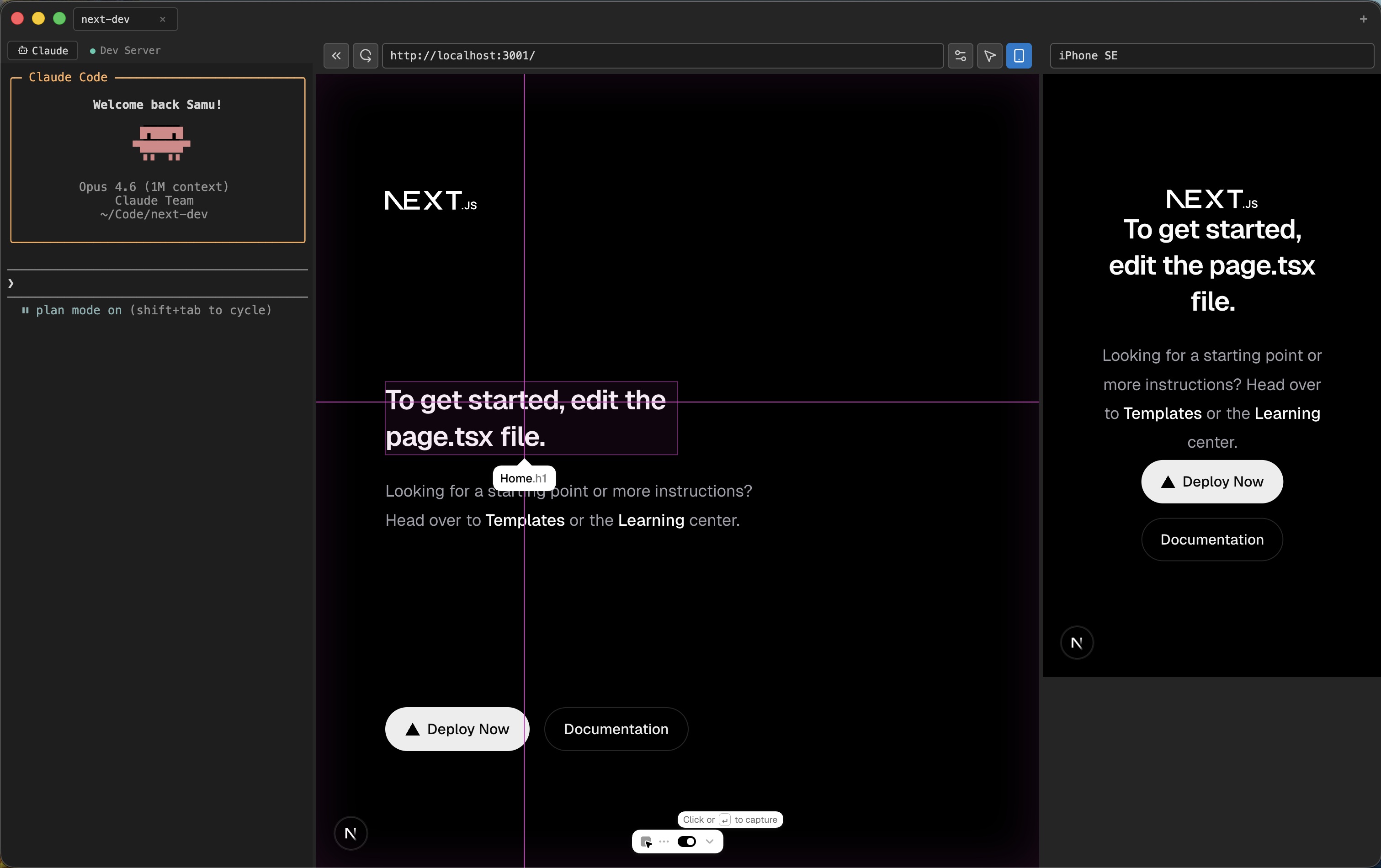
A dedicated workspace for AI-assisted development.
Peer combines a terminal, a live browser and an AI-powered inspector into one seamless interface. No browser tabs juggling, no manual copy-paste. Open your project, run the dev server and start building — with Claude as your pair programmer.
Core experience:
- Terminal + Browser
- AI Inspector
- Mobile Preview
- Multi-Project Tabs
Features
01. Dual Terminal
Two independent terminals in the same panel.
- • Claude tab — runs Claude Code automatically on open
- • Dev Server tab — isolated process for your dev server
- • Auto-detects localhost port from server output
- • Browser reloads when the server is ready
02. AI Inspector + React Grab
Click any element and send full context to Claude. Powered by React Grab for deep component introspection.
- • HTML, computed CSS, matched rules and box model
- • React Grab extracts component name, file and line number
- • Walks the React fiber tree for full component metadata
- • Accessibility tree and ARIA attributes
- • Formatted markdown sent directly to Claude Code
03. Mobile Preview
Test responsive layouts without leaving the app.
- • iPhone, iPad and custom device presets
- • Real device emulation via Chromium API
- • Scales to fit available space
- • Syncs navigation with main browser
04. Smart Setup
Open a project and start coding in seconds.
- • Detects Node.js, package manager and scripts
- • Installs dependencies when needed
- • Per-project settings persisted automatically
- • nvm version selection per project
How it works
01 Open a project folder. Peer scans and configures the environment.
02 Code with Claude in the terminal while the browser shows your app live.
03 Inspect any element. Full HTML, CSS and React context is sent to Claude.
04 Ship faster. Less context-switching, more building.
Keyboard shortcuts
Toggle element inspector Cmd + Shift + C
Toggle DevTools Cmd + Option + I
New project tab Cmd + T
Close current tab Cmd + W

v0.1.0 — Free
Ready to build?
Terminal, browser and AI in one window.
Your companion for Claude Code.
Download for Mac
.dmg
Universal binary — Apple Silicon & Intel
Windows version →
Download for Windows
.exe
Windows 10+ supported
Mac version →